
By now you have the hard parts handled. You can write a structured prompt that gives you a shot instead of a wish, you can keep one character consistent across a hundred stills, and you can carry that character into motion. What nobody warns you about is the stage that sits between a folder full of approved prompts and a finished video, and it is the stage that actually eats your week.
It looks trivial until you are in it. You have three hundred prompts. Each one has to go into your image tool, the output has to be approved, the keeper has to go into your video tool, and that clip has to land in your editor at the right spot in the script. Do that by hand and by shot eighty you are staring at a folder of img_4821.png files with no idea which scene they belong to, copy-pasting prompt 211 of 340 into the right node, and quietly losing the afternoon. The fix is not a fancier tool. It is a boring, repeatable system, and it comes down to four habits.
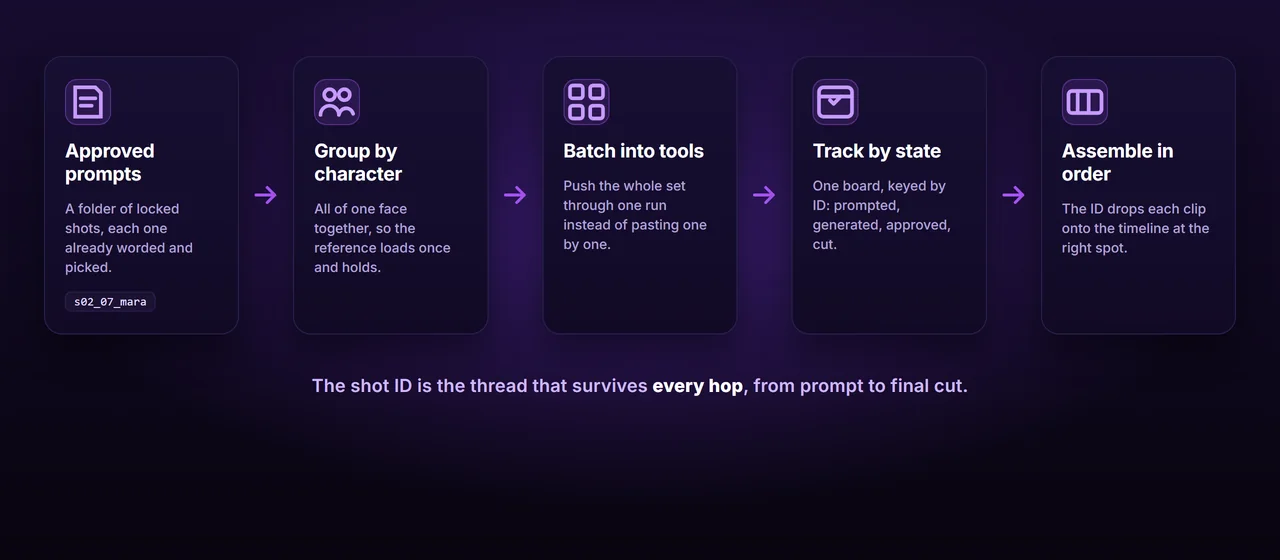
This is the backbone, and it costs you five minutes up front. Before you generate anything, give every shot a short, stable ID built from scene, shot, and character: s02_07_mara. That ID then rides with the shot through every single stage. The prompt is filed under it, the generated image is saved as it, the video clip carries it, and the final export uses it.
Skip this and you get a folder of meaningless filenames and a memory you do not have. Keep it and anything is findable in seconds, and, crucially, your editor can assemble the whole video in script order without asking you a single question, because the order is encoded in the name. Most of the chaos people blame on AI tools is actually a missing naming convention. Pick the format once and never break it.
One extension earns its keep on any long project: add a take number when you re-roll a shot. The third attempt becomes s02_07_mara_v3. Now “which one did we approve” stops being a question you answer from memory, your editor never grabs a rejected take by accident, and your tracker can point at the exact version that made the cut. Since you will re-roll a meaningful share of shots anyway, building the take number in from the start costs nothing and saves you the day you have four near-identical files and no idea which is the keeper.
Your instinct is to work in story order: shot one, then two, then three. For the generation step, do the opposite and group every shot by character. All of Mara’s shots together, all of the detective’s together, regardless of where they fall in the script.
The reason is consistency, and it ties straight back to the character consistency work. The reference image or trained model for a character should be loaded once and run across that character’s entire set, so the face holds and you are never mixing one character’s reference into another’s shot. Batching one identity at a time is both more consistent and far faster than reloading references shot by shot. You generate by character and reassemble by scene later, using the IDs from habit one. Generate by character, edit by scene.
Feeding one prompt at a time into a web box is precisely where the afternoon disappears. Every serious image tool accepts a batch, so use it. ComfyUI has batching nodes that push a whole list of prompts, or an entire folder of images, through one workflow in a single run. Magnific (Freepik) Spaces and Krea nodes take sets at a time, and canvas tools like Wireflow let you wire a character’s images straight into their video shots.
Push a character’s entire prompt set in one go, let it run, and come back to a finished folder. The real skill here is not the clicking, it is the preparation: a clean, ID’d, character-grouped list that the batch can just chew through. Once the input is organized, the generation is the easy part. If you find yourself pasting prompts individually, stop and go set up the batch instead. It pays for itself by the tenth shot.
Every shot in a long video moves through states: prompted, generated, approved, animated, cut. With hundreds of shots, you cannot hold that in your head. Keep one simple board or sheet, keyed by shot ID, with a column for each state, and update it as you go.
This is not bureaucracy, it is the only honest answer to “is this actually done.” Even mature production rejects roughly one shot in fifteen and re-rolls it, and without a tracker those rejects quietly vanish until you are watching the final cut and a shot is missing or wrong. The board is also your quality control: the proven pattern is to let the AI do ninety percent and keep a human for the final ten percent of judgment, and the board is what tells you which ten percent still needs your eyes.
It does not need to be fancy. A spreadsheet with one row per shot ID and a column per state works perfectly, and a simple kanban board with a lane for each stage works even better if you like to see the pile move. The format matters far less than the rule: nothing is “done” until the board says so, and the board is the single source of truth when your memory and your folder disagree.
The handoff that actually eats your time
The pipeline is longer than it looks: script, then prompts, then images, then video clips, then the edit, and your character has to survive every hop. The image is your anchor, the key frame we talked about in the video post: generate it, approve it, then run image-to-video from that exact frame. The thread that holds the whole chain together is that the shot ID never changes. A clip named s02_07_mara drops onto the timeline at scene two, shot seven, no matter what order it was generated in or how many tools it passed through. Keep the ID stable and assembly becomes mechanical instead of a scavenger hunt through unnamed files.
Where this breaks, and why it is worth automating
Done by hand, this system genuinely works. It is also the most tedious part of the entire production, and it scales badly. A thirty-shot video is mildly annoying. A three-hundred-shot one is a part-time job in spreadsheet management, and every minute of it is minutes not spent on the script or the picks, which are the only parts that actually need you.
That is the tell that this seam is built to be automated. The IDs, the grouping by character, the batching into tools, the state tracking, are all mechanical and rule-based. None of it requires taste. Your judgment belongs on the writing and the final yes or no, not on routing prompt 211 of 340 into the correct node.
This is the part BatchFrames does for you
BatchFrames turns your script into structured, consistent prompts, keeps every character worded identically with @mention tags, and exports the approved set grouped by character route straight into the list nodes and spaces of the image and video tools you already use. The IDs, the grouping, the routing, and the tracking happen automatically, so the only things left for you are the script and the final yes.
Where to go from here
That closes the loop. A great prompt, a character that holds across stills and into motion, and a system to route the whole set into your tools and back into a finished cut without dropping a shot along the way. The thread running through all four posts is the same unglamorous idea: consistency at scale is mostly discipline, not magic. Pick your words, lock your character, name your shots, and let the AI do the heavy lifting while you keep the judgment.
Build the system once, on a small video, before you need it. The first time you run a three-hundred-shot project through a process that already works, you will feel exactly how much of “AI video is hard” was never about the AI at all.